Module 5 Lesson 1

Making textual web builder

One of the first steps in creating a website is adding text. All of Website.com’s templates are pre-populated with sample content, including text. The sample content is intended to give you a head start by showing you the content you can have, and a possible way to arrange them on your web page.

But in order to make your website yours, you will need to replace them with your own content. For example, you will need to at the very least replace the sample contact information with your own actual contact information.

In this article, we will show you how to add and edit text on your website using the Text tool in your Website.com editor.

Website.com Text tool

You will find the Text tool in the left menu on your Website.com editor, under Add > Text.
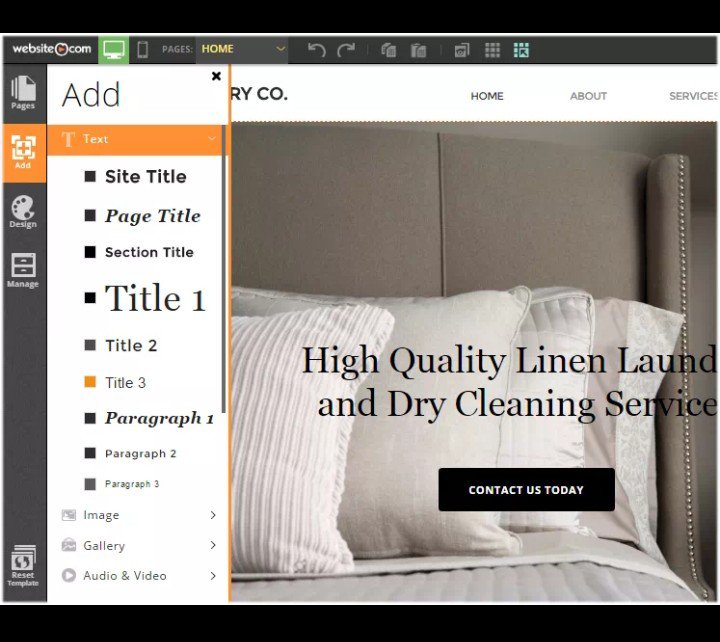
Text is added via drag-and-drop. This means, once you have click on the add text button, a placeholder textbox will be added to your web page. You can drag the textbox to the desired location and then edit the text as you wish.

As you can see, the selection of text you can add to your website quite complete. Note that these are all themed font style – font styles that are based on the template design. This is to ensure font style is consistent throughout your website.

Once you have selected the font style that you want to add, a placeholder textbox will be added to your web page and all you need to do is drag and drop it to the desired location on your web page. Because Website.com uses absolute positioning, you can drop the text virtually anywhere on your web page.

Editing text on your web page

To edit the text (ie. replace it with your own), simply double-click on the textbox and the text editor will appear.
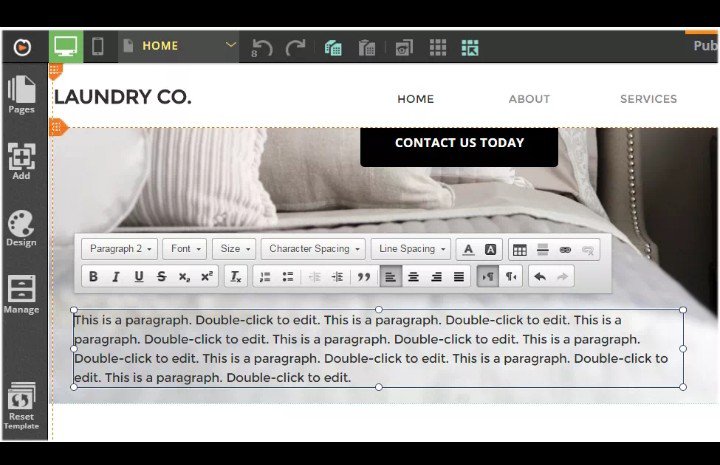
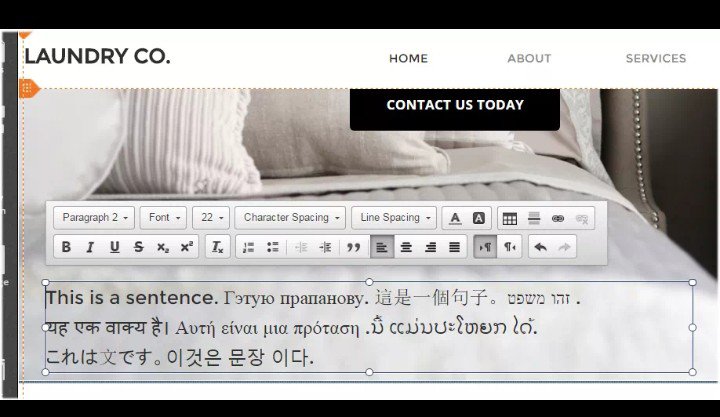
Using the text editor, you can make changes to the style, alignment, size, color, character and line spacing, and you can add links, dividers and tables into the textbox area.

Making global text style changes

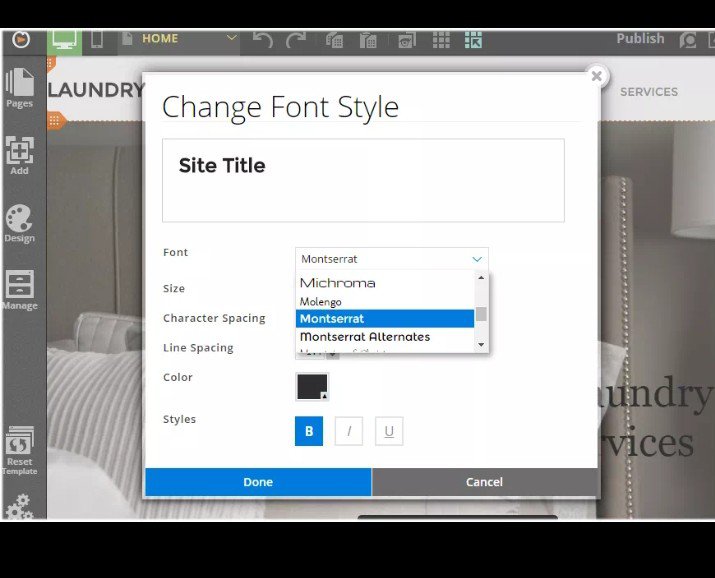
But note that the changes you make on the text editor is local – it only applies to the text content of that particular textbox. To make global text style changes (ie. if you want to change the style of the pre-set Site Title so that all site titles you add on your website will reflect the new style), you will need to do so via the Font Styles manager.
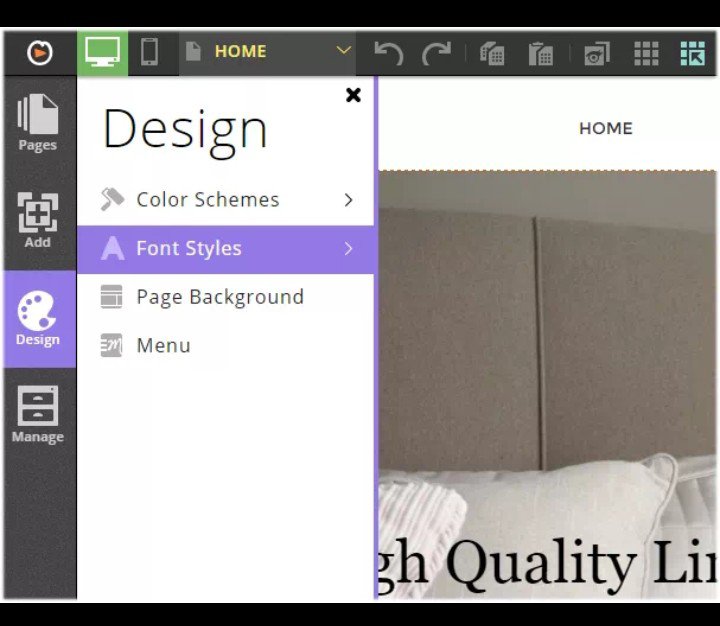
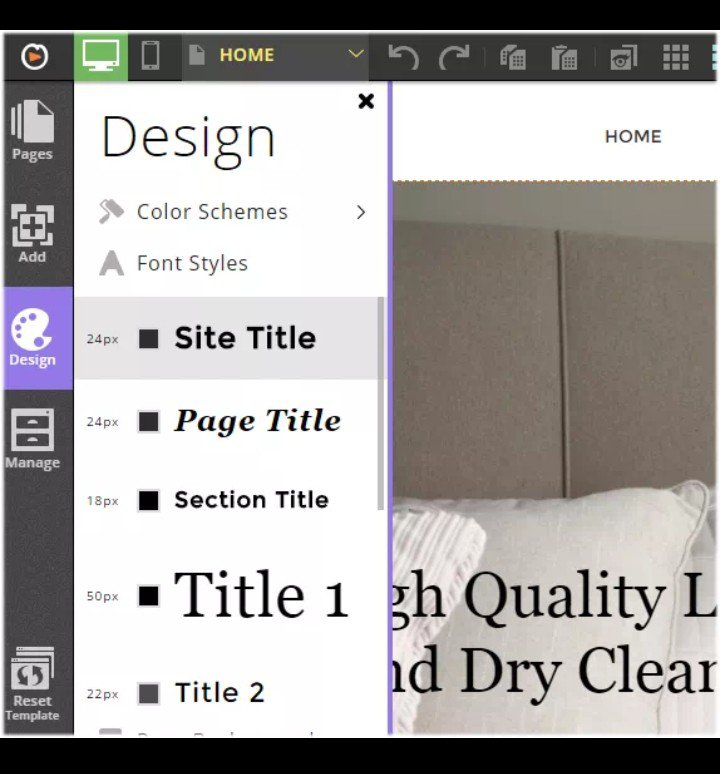
You are free to customize the themed font styles as you wish. Once you have made your font style changes here, changes will affect all text content on your website that is using that themed font style, including existing text and text that you will add in the future.

One last thing to mention, the Website.com editor is multi-lingual – you can add your text in any language you need, making Website.com a true multi-lingual website builder.
My church family 😊 It’s a great previlage to be a child of God. As a youngs we must enjoy our life in God’s presence. Believing that our Abba Father has a better plans for us. ( Hebrew 11:40) Give your time unto Him because He is our savior. He is our writer of our live. In Jeremiah 29:11 For I know the plan I have for you, said to the Lord. Plan to prosper you not to harm you plan to give hope and a good future. Shalom😊😇

Introduce Yourself (Example Post)

This is an example post, originally published as part of Blogging University. Enroll in one of our ten programs, and start your blog right.

You’re going to publish a post today. Don’t worry about how your blog looks. Don’t worry if you haven’t given it a name yet, or you’re feeling overwhelmed. Just click the “New Post” button, and tell us why you’re here.

Why do this?

  • Because it gives new readers context. What are you about? Why should they read your blog?
  • Because it will help you focus your own ideas about your blog and what you’d like to do with it.

The post can be short or long, a personal intro to your life or a bloggy mission statement, a manifesto for the future or a simple outline of your the types of things you hope to publish.

To help you get started, here are a few questions:

  • Why are you blogging publicly, rather than keeping a personal journal?
  • What topics do you think you’ll write about?
  • Who would you love to connect with via your blog?
  • If you blog successfully throughout the next year, what would you hope to have accomplished?

You’re not locked into any of this; one of the wonderful things about blogs is how they constantly evolve as we learn, grow, and interact with one another — but it’s good to know where and why you started, and articulating your goals may just give you a few other post ideas.

Can’t think how to get started? Just write the first thing that pops into your head. Anne Lamott, author of a book on writing we love, says that you need to give yourself permission to write a “crappy first draft”. Anne makes a great point — just start writing, and worry about editing it later.

When you’re ready to publish, give your post three to five tags that describe your blog’s focus — writing, photography, fiction, parenting, food, cars, movies, sports, whatever. These tags will help others who care about your topics find you in the Reader. Make sure one of the tags is “zerotohero,” so other new bloggers can find you, too.

Introduce Yourself (Example Post)

This is an example post, originally published as part of Blogging University. Enroll in one of our ten programs, and start your blog right.

You’re going to publish a post today. Don’t worry about how your blog looks. Don’t worry if you haven’t given it a name yet, or you’re feeling overwhelmed. Just click the “New Post” button, and tell us why you’re here.

Why do this?

  • Because it gives new readers context. What are you about? Why should they read your blog?
  • Because it will help you focus your own ideas about your blog and what you’d like to do with it.

The post can be short or long, a personal intro to your life or a bloggy mission statement, a manifesto for the future or a simple outline of your the types of things you hope to publish.

To help you get started, here are a few questions:

  • Why are you blogging publicly, rather than keeping a personal journal?
  • What topics do you think you’ll write about?
  • Who would you love to connect with via your blog?
  • If you blog successfully throughout the next year, what would you hope to have accomplished?

You’re not locked into any of this; one of the wonderful things about blogs is how they constantly evolve as we learn, grow, and interact with one another — but it’s good to know where and why you started, and articulating your goals may just give you a few other post ideas.

Can’t think how to get started? Just write the first thing that pops into your head. Anne Lamott, author of a book on writing we love, says that you need to give yourself permission to write a “crappy first draft”. Anne makes a great point — just start writing, and worry about editing it later.

When you’re ready to publish, give your post three to five tags that describe your blog’s focus — writing, photography, fiction, parenting, food, cars, movies, sports, whatever. These tags will help others who care about your topics find you in the Reader. Make sure one of the tags is “zerotohero,” so other new bloggers can find you, too.